
In the previous chapters, we have already come across some warnings. Warnings are displayed during the process of information to tell you that something is wrong about the structure. It may imply a wrong graphic.
It is highly recommended to fix the problem that produced a warning, even if the graphic generated is correct.
We will explain existing warnings through simple examples.
Save the code below under editor/XML/Examples/warning1.grp :
    <?xml version="1.0" encoding="ISO-8859-1"?>
    <!DOCTYPE grp SYSTEM "../grp.dtd">
    <grp>
      <vbox id="vbox">
        <tbox id="tbox1" fontSize="20">Longer text</tbox>

        <tbox id="tbox2" fontSize="20">Short text</tbox>
      </vbox>
    </grp>
In a console, change to directory editor/XML/Examples (if not already
done), and then type :
java -cp ../../lib/taxi.jar fr.loria.taxi.transformer.TransformerGRPToSVG -grp_in warning1.grp -defs examples.def -svg_dtd ../svg.dtd
You should see the following output :
    Parsing file examples.def
    Parsing file warning1.grp
    Warning: vertical box whose id is 'vbox' contains 2 boxes (id 'tbox2' & 'tbox1') with different widths (95.0 & 109.0)
    Creating SVG document
    Generating SVG file warning1.svg
And this graphic :
We simply placed 2 tbox inside a single vbox. The problem
here is that the 2 tbox don't have the same width as they don't have the
same text. These 2 tbox are contained in the same vbox. But,
as being non-final, this vertical box must contain boxes that have the same
width. This is not the case, a warning is generated.
The message in itself is clear (much clearer since we placed id on our
our boxes). The width of the tbox tbox1 is 95 and the tbox tbox2's
109.
We must embed each tbox inside a non-final box with a spring
that can stretch.
Modify editor/XML/Examples/warning1.grp (changes are indicated in bold) :
    <?xml version="1.0" encoding="ISO-8859-1"?>
    <!DOCTYPE grp SYSTEM "../grp.dtd">
    <grp>
      <vbox id="vbox">
        <hbox>
          <tbox id="tbox1" fontSize="20">Longer text</tbox>
          <spring/>
        </hbox>

        <hbox>
          <tbox id="tbox2" fontSize="20">Short text</tbox>
          <spring/>
        </hbox>
      </vbox>
    </grp>
Transform :
java -cp ../../lib/taxi.jar fr.loria.taxi.transformer.TransformerGRPToSVG -grp_in warning1.grp -defs examples.def -svg_dtd ../svg.dtd
You should get a clear output (no warning) :
    Parsing file examples.def
    Parsing file warning1.grp
    Creating SVG document
    Generating SVG file warning1.svg
And a correct graphic :
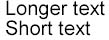
Note : actually, only tbox2 needed to be embedded inside a
hbox containg a spring as it was the smaller tbox.
Save the code below under editor/XML/Examples/warning2.grp :
    <?xml version="1.0" encoding="ISO-8859-1"?>
    <!DOCTYPE grp SYSTEM "../grp.dtd">
    <grp>
      <hbox id="hbox" maxSize="30">
        <tbox id="tbox" fontSize="20">Some text</tbox>
      </hbox>
    </grp>
In a console, change to directory editor/XML/Examples (if not already
done), and then type :
java -cp ../../lib/taxi.jar fr.loria.taxi.transformer.TransformerGRPToSVG -grp_in warning2.grp -defs examples.def -svg_dtd ../svg.dtd
You should see the following output :
    Parsing file examples.def
    Parsing file warning2.grp
    Warning: OverFull for box whose id is 'hbox' (99.0 > 30.0)
    Creating SVG document
    Generating SVG file warning2.svg
And this graphic (this we are lucky, it is correct) :

We specified a maxSize of 30 for our hbox. This box contains
a tbox that contains the text Some text, which is 99 wide. There
is a contradiction here as we want the hbox to be 30 wide at maximum whilst
it needs to be 99 wide at minimum to be able to hold the tbox. In other words,
the hbox is not big enough (or its content is too big). This box is said
OverFull Box.
In the warning message, inside parenthesis, we can see the size requested by the box's
content (99, a width since the box is a hbox), and the maximum size allowed
(30, a width since the box is a hbox).
The choosen example is very simple, so, many solutions are available to solve the problem. In a real situation, you would use one of these depending on what you want to do :
maxSize, so the default value
infinite will be assumed,
infinite as maxSize for the box)
fitToChildren. This value means that
the maximum size of the box will be the minimum size requested by its child elements,
in other words, its content.
We will choose the third solution. Modify editor/XML/Examples/warning2.grp :
    <?xml version="1.0" encoding="ISO-8859-1"?>
    <!DOCTYPE grp SYSTEM "../grp.dtd">
    <grp>
      <hbox id="hbox" maxSize="fitToChildren">
        <tbox id="tbox" fontSize="20">Some text</tbox>
      </hbox>
    </grp>
In a console, change to directory editor/XML/Examples (if not already
done), and then type :
java -cp ../../lib/taxi.jar fr.loria.taxi.transformer.TransformerGRPToSVG -grp_in warning2.grp -defs examples.def -svg_dtd ../svg.dtd
You should see the following output with no more warning :
    Parsing file examples.def
    Parsing file warning2.grp
    Creating SVG document
    Generating SVG file warning2.svg
And this graphic is still correct :
Save the code below under editor/XML/Examples/warning3.grp :
    <?xml version="1.0" encoding="ISO-8859-1"?>
    <!DOCTYPE grp SYSTEM "../grp.dtd">
    <grp>
      <hbox id="hbox" minSize="300">
        <tbox id="tbox" fontSize="20">Some text</tbox>
      </hbox>
    </grp>
In a console, change to directory editor/XML/Examples (if not already
done), and then type :
java -cp ../../lib/taxi.jar fr.loria.taxi.transformer.TransformerGRPToSVG -grp_in warning3.grp -defs examples.def -svg_dtd ../svg.dtd
You should see the following output :
    Parsing file examples.def
    Parsing file warning3.grp
    Warning: UnderFull for box whose id is 'hbox' (99.0 < 300.0)
    Creating SVG document
    Generating SVG file warning3.svg
And this graphic (this we are lucky, it is correct) :

We specified a minSize of 300 for our hbox. This box contains
a tbox that contains the text Some text, which is 99 wide. There
is a contradiction here as we want the hbox to be 300 wide at minimum whilst
its contents cannot be wider than 99 (indeed, its content is only a tbox, which
is a final box, so it cannot stretch). In other words, the hbox is too big
(or its content is too small). This box is said UnderFull Box.
In the warning message, inside parenthesis, we can see the size requested by the box's
content (99, a width since the box is a hbox), and the minimum size allowed by
the box (300, a width since the box is a hbox).
The choosen example is very simple, so, many solutions are available to solve the problem. In a real situation, you would use one of these depending on what you want to do :
minSize, so the default value 0
will be assumed,
minSize for the box)
spring that will be able
to strectch enough.
We will choose the third solution. Modify editor/XML/Examples/warning3.grp :
    <?xml version="1.0" encoding="ISO-8859-1"?>
    <!DOCTYPE grp SYSTEM "../grp.dtd">
    <grp>
      <hbox id="hbox" minSize="300">
        <tbox id="tbox" fontSize="20">Some text</tbox>
        <spring/>
      </hbox>
    </grp>
In a console, change to directory editor/XML/Examples (if not already
done), and then type :
java -cp ../../lib/taxi.jar fr.loria.taxi.transformer.TransformerGRPToSVG -grp_in warning3.grp -defs examples.def -svg_dtd ../svg.dtd
You should see the following output with no more warning :
    Parsing file examples.def
    Parsing file warning3.grp
    Creating SVG document
    Generating SVG file warning3.svg
And this graphic is still correct :
Save the code below under editor/XML/Examples/warning4.grp :
    <?xml version="1.0" encoding="ISO-8859-1"?>
    <!DOCTYPE grp SYSTEM "../grp.dtd">
    <grp>
      <hbox>
        <tbox id="tbox" background="txt" fontSize="20">Some text</tbox>
      </hbox>
    </grp>
In a console, change to directory editor/XML/Examples (if not already
done), and then type :
java -cp ../../lib/taxi.jar fr.loria.taxi.transformer.TransformerGRPToSVG -grp_in warning4.grp -defs examples.def -svg_dtd ../svg.dtd
You should see the following output :
    Parsing file examples.def
    Parsing file warning4.grp
    Warning: background 'txt', for box whose id is 'tbox', not found among the definitions.
    Creating SVG document
    Generating SVG file warning4.svg
And this graphic (with no background) :

We simply used a background that doesn't exist in the definitions document.
In this case, you can choose :
id you want
to use,
We will choose the third solution. Modify editor/XML/Examples/warning4.grp
(background text has been created in chapter
Using backgrounds) :
    <?xml version="1.0" encoding="ISO-8859-1"?>
    <!DOCTYPE grp SYSTEM "../grp.dtd">
    <grp>
      <hbox>
        <tbox id="tbox" background="text" fontSize="20">Some text</tbox>
      </hbox>
    </grp>
In a console, change to directory editor/XML/Examples (if not already
done), and then type :
java -cp ../../lib/taxi.jar fr.loria.taxi.transformer.TransformerGRPToSVG -grp_in warning4.grp -defs examples.def -svg_dtd ../svg.dtd
You should see the following output :
    Parsing file examples.def
    Parsing file warning4.grp
    Creating SVG document
    Generating SVG file warning4.svg
And this graphic (now with background) :
