
A background is a property common to every box, final or non-final. On the graphic, a background is placed behind the content of the box, whatever it is. The background will have the size of the box, it is never used to determine the size of the box.
Save the following code under editor/XML/Examples/background.grp :
    <?xml version="1.0" encoding="ISO-8859-1"?>
    <!DOCTYPE grp SYSTEM "../grp.dtd">
    <grp>
      <vbox background="back">
        <spring minSize="10"/>

        <hbox>
          <spring minSize="10"/>
          <tbox background="text" fontSize="30" fontStyle="italic">Using backgrounds</tbox>
          <spring minSize="10"/>
        </hbox>

        <spring minSize="10"/>
      </vbox>
    </grp>
Modify the document editor/XML/Examples/examples.def, add the lines that
appear in bold :
    <?xml version="1.0" encoding="ISO-8859-1"?>
    <!DOCTYPE definitions SYSTEM "../definitions.dtd">
    <definitions>
      <definition id='back' width='10' height='10'>
        <rect x='0' y='0' width='10' height='10' style='fill:yellow'/>
      </definition>

      <definition id='text' width='60' height='20'>
        <rect x='0' y='0' rx="10" ry="10" width='60' height='20' style='fill:rgb(3,189,147); opacity:0.7'/>
      </definition>
    </definitions>
In a console, change to directory editor/XML/Examples (if not already done), and then type :
java -cp ../../lib/taxi.jar fr.loria.taxi.transformer.TransformerGRPToSVG -grp_in background.grp -defs examples.def -svg_dtd ../svg.dtd
You should see the following output :
    Parsing file examples.def
    Parsing file background.grp
    Creating SVG document
    Generating SVG file background.svg
The SVG looks like this :
There are 2 parts to explain here : the GRP document itself and the definitions document.
In the GRP document, we just set the background attribute to a specific value.
This value will be present as the id of a definition located in the definitions
document.
In our example, the backgrounds called are back and text. Thus,
it is expected that definitions document contains a defintion with id
back and a definition with id text.
This document is composed of definitions. Each definition has the following attributes :
| Attribute name | Description | Allowed values | Default value | Mandatory |
height |
Specifies the height of the graphic area used by this definition. | Real values starting at 0. | - | Yes |
id |
The identifier of this definition (must be unique inside the document). | Any value. | - | Yes |
width |
Specifies the width of the graphic area used by this definition. | Real values starting at 0. | - | Yes |
Attribute id identifies the definition. This attribute's value must be
unique inside the whole document.
Attributes width and height defines the size of the area you
can draw on. A definition contains some SVG snippets (see
SVG specification to know more
about SVG). You can place many SVG instructions inside the same definition.
In our example, the definition whose id is text defines an
area of 60 wide and 20 high. On this area is painted a full green rectangle with rounded
corners whose coordinates are (0, 0), width 10, and height 10. Thus, almost the whole
area is painted. Below is our area drawn :
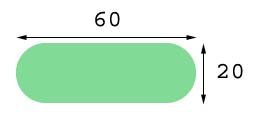
This definition is applied as the background of the innermost tbox whose
width is 270 and height 30. a background always fits the size of the box it is applied to.
The definition will stretch to be 270 wide and 30 high. A factor of 270 / 60 is applied
on the X axis and a factor of 30 / 20 is applied on the Y axis. The background of the
tbox looks like shown on the picture below :

What happens if you try to use a definition that is not listed in the definitions
document. Just try it. Modify your GRP document to change the background of the
tbox from text to texte :
    <?xml version="1.0" encoding="ISO-8859-1"?>
    <!DOCTYPE grp SYSTEM "../grp.dtd">
    <grp>
      <vbox background="back">
        <spring minSize="10"/>

        <hbox>
          <spring minSize="10"/>
          <tbox background="texte" fontSize="30" fontStyle="italic">Using backgrounds</tbox>
          <spring minSize="10"/>
        </hbox>

        <spring minSize="10"/>
      </vbox>
    </grp>
Apply the transformation :
java -cp ../../lib/taxi.jar fr.loria.taxi.transformer.TransformerGRPToSVG -grp_in background.grp -defs examples.def -svg_dtd ../svg.dtd
You should see the following output :
    Parsing file examples.def
    Parsing file background.grp
    Warning: background 'texte', for box whose id is '', not found among the definitions.
    Creating SVG document
    Generating SVG file background.svg
You got a warning that tells you that the background of a box wasn't found in the definitions document.
The SVG now looks like this :
