
-debug modeIn previous chapters, we sometimes used the -debug option when
transforming XML documents. This option is available with both modes XML to SVG and GRP
to SVG.
The use of the -debug mode produces a graphic that contains additional
graphical elements. These extra elements show the structure of boxes and springs.
The best way to understand this mode is to have an simple example.
Save the following code under editor/XML/Examples/debugMode.grp :
    <?xml version="1.0" encoding="ISO-8859-1"?>
    <!DOCTYPE grp SYSTEM "../grp.dtd">
    <grp>
      <vbox maxSize="100">
        <hbox minSize="15">
          <ebox width="20"/>
          <spring minSize="10"/>
        </hbox>

        <tbox fontSize="30">Some text</tbox>
      </vbox>
    </grp>
Open a console, go to directory editor/XML/Examples, and transform it
with the following command :
java -cp ../../lib/taxi.jar fr.loria.taxi.transformer.TransformerGRPToSVG -grp_in debugMode.grp -defs examples.def -svg_dtd ../svg.dtd -debug
You should obtain that output :
    Parsing file examples.def
    Parsing file debugMode.grp
    Creating SVG document
    Generating SVG file debugMode.svg
That window should appear (after resizing and expanding all the nodes of the tree) :
You can notice that the tree is the same structure than the GRP document :
The generated graphic looks like this :
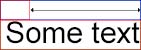
The window that shows information about the structure of the boxes and springs displays only relevant information for debugging purposes of that structure.
In our example, there is only one spring :

Here is the list of the properties shown for a spring :
| Property name | Description |
maxSizeAllowed |
Reflect the attribute minSize of the tag spring. |
minSizeAllowed |
Reflect the attribute minSize of the tag spring. |
realSize |
This is the size of the spring (comprised between minSizeAllowed and
maxSizeAllowed). |
In our example, we have 4 boxes. Here is the list of the properties shown common to every box :
| Property name | Description | hbox |
vbox |
ebox |
tbox |
heightExpansion |
For development purpose only. | - | - | - | - |
id |
The identifier of the box, if any. | - | - | - | - |
maxHeighthAllowed |
The maximum height the box is allowed to be. | Is always infinite. |
Reflects the attribute maxSize. |
Reflects the attribute height. |
Is always the value of the text height it contains. |
maxHeightComputed |
The maximum height the content of the box can be. | - | - | Reflects the attribute height. |
Is always the value of the text height it contains. |
maxWidthAllowed |
The maximum width the box is allowed to be. | Reflects the attribute maxSize. |
Is always infinite. |
Reflects the attribute width. |
Is always the value of the text width it contains. |
maxWidthComputed |
The maximum width the content of the box can be. | - | - | Reflects the attribute width. |
Is always the value of the text width it contains. |
minHeighthAllowed |
The minimum height the box is allowed to be. | Is always 0 | Reflects the attribute minSize. |
Reflects the attribute height. |
Is always the value of the text height it contains. |
minHeightComputed |
The minimum height the content of the box can be. | - | - | Reflects the attribute height. |
Is always the value of the text height it contains. |
minWidthAllowed |
The minimum width the box is allowed to be. | Reflects the attribute minSize. |
Is always 0. | Reflects the attribute width. |
Is always the value of the text width it contains. |
minWidthComputed |
The minimum width the content of the box can be. | - | - | Reflects the attribute width. |
Is always the value of the text width it contains. |
realHeight |
This is the height of the box (must be comprised between maximum(minHeightAllowed, minHeightComputed) and minimum(maxHeightAllowed, maxHeightComputed)). | - | - | Reflects the attribute width. |
Is always the value of the text width it contains. |
realWidth |
This is the width of the box (must be comprised between maximum(minWidthAllowed, minWidthComputed) and minimum(maxWidthAllowed, maxWidthComputed)). | - | - | Reflects the attribute width. |
Is always the value of the text width it contains. |
widthExpansion |
For development purpose only. | - | - | - | - |
xAbsolute |
The position on the graphic along the X-axis of the top left corner of the box. | - | - | - | - |
yAbsolute |
The position on the graphic along the Y-axis of the top left corner of the box. | - | - | - | - |
eboxIn addition to the properties common to every boxe, a box ebox has the
following properties :
| Property name | Description |
height |
Reflect the attribute height of the tag ebox. |
width |
Reflect the attribute width of the tag ebox. |
tboxIn addition to the properties common to every boxe, a box tbox has the
following properties :
| Property name | Description |
text |
Reflect the text contained by the box tbox. |