
We saw in the previous chapter how to apply transformation from command line. In this chapter, we will explain how to apply transformation by programming.
You still need the following things :
In this first step, we will code the example to set up the main architecture. During the second step, we will really build the list of paramaters needed by the Transformer.
Save the following code under editor/test/GRPToSVGTest.java :
    import fr.loria.taxi.transformer.TransformerGRPToSVG;
    import fr.loria.taxi.transformer.util.GRPToSVGParameters;


    public class GRPToSVGTest {
      /**
       * This method prepares the parameters needed by the process of transformation. If any
       * error happens, we display an error message and leave the application.
       *
       * @return The list of parameters as an GRPToSVGParameters object.
       */
      public static GRPToSVGParameters getParameters() {
        GRPToSVGParameters parameters = null;

        try {
          // The array containing the parameters
          String[] args = new String[0];

          // HERE WE SHOULD FILL IN THE args ARRAY WITH THE LIST OF PARAMETERS AND THEIR VALUE

          parameters = new GRPToSVGParameters(args);
        } catch (Exception e) {
          // We report any error that might happen with the parameters and leave the application
          System.err.println("-- Something wrong with the parameters --");
          System.err.println(e.getMessage());
          System.exit(1);
        }

        return parameters;
      }


      /**
       * Main method.
       */
      public static void main(String[] args) {
        try {
          // Prepares the list of parameters
          GRPToSVGParameters parameters = getParameters();

          // Creates the Transformer and calls the process() method that operates the process
          // of transformation
          new TransformerGRPToSVG(parameters).process();

          // We force the exit of the application because an instance of an AWT object has been
          // created during the process of transformation, thus, the system doesn't relinquish
          // control as it assumes that some GUI is running.
          System.exit(0);
        } catch (Exception e) {
          // We report any error that might happen during the process of transformation
          System.err.println("-- Something wrong happened during the transformation --");
          System.err.println(e.getMessage());
        }
      }
    }
Open a console, go to directory editor/test and compile
GRPToSVGTest.java with the following command :
javac -classpath ../lib/taxi.jar GRPToSVGTest.java
For compiling, you must specify the jar containing the classes
transformer.TransformerGRPToSVG and import fr.loria.taxi.transformer.util.GRPToSVGParameters
imported at the very top of your code. These 2 classes are contained in the jar
taxi.jar (in directory lib) shipped with TAXI.
Note : classes and sources are usually not saved in the same directory. This is not the case with the previous command line used for compiling. I chose to do that to focus only on the process of transformation and use the minimum number of necessary options on the command line.
You must import 2 classes :
transformer.TransformerGRPToSVG : the Transformer used to apply the
transformation,transformer.util.GRPToSVGParameters : holds the parameters passed to
the Transformer.The method main(String[] args) does 2 things :
GRPToSVGParameters object by calling the method
getParameters(),GRPToSVGParameters
object as parameter) and applies the tranformation by calling the method process()
on that object.A try catch block encloses this code as Exception may be
thrown during the transformation.
We wrote a method called getParameters() to prepare the GRPToSVGParameters
object that holds the different parameters and their respective value. In this method, we
instanciate a GRPToSVGParameters object (the constructor takes an array of
String objects that represents the transformation process' parameters and their value).
We didn't specify yet the list of parameters in that array of String. We are
going to do that in the Second step.
The creation of the GRPToSVGParameters is enclosed in a try catch
block as it may throw Exception if something is wrong with the arrays of String
representing the transformation process' parameters and their value. In such a case, we
display an error message and stop the application.
The lines in bold in the code above are very important. When the process of transformation
ends successfully, the Java Virtual Machine does not relinquish control, thus, we force
the application to end with System.exit(0);. Why does not the Java Virtual Machine
relinquish control ? Because an instance of a java.awt.Label may have
been created by the class grp.FinalBoxTextContent to compute the size of the
string contained by a tbox (a text box of the GRP document). Then, the Java
Virtual Machine assumes that some GUI is running and keeps turning even when the end of
the method main(String[] args) is reached.
Run the example with this command (depending on the OS you run it, you will not use the same classpath separator) :
    java -classpath ../lib/taxi.jar;. GRPToSVGTest (under Windows)
    java -classpath ../lib/taxi.jar:. GRPToSVGTest (under other OS)
You get the following output :
    -- Something wrong with the parameters --
    Parameter 'defs' is missing.
In the method getParameters(), we got an Exception because,
so far, the object GRPToSVGParameters is created with an empty array. We
intercepted this Exception, showed its message, and left the application.
We will now complete the previous example by adding parameters to transform a GRP
document shipped with TAXI : editor/XML/XML/ex1.cd.grp.
Modify editor/test/GRPToSVGTest.java (changes are indicated in bold) :
    import fr.loria.taxi.transformer.TransformerGRPToSVG;
    import fr.loria.taxi.transformer.util.Parameters;
    import fr.loria.taxi.transformer.util.GRPToSVGParameters;


    public class GRPToSVGTest {
      /**
       * This method prepares the parameters needed by the process of transformation. If any
       * error happens, we display an error message and leave the application.
       *
       * @return The list of parameters as an GRPToSVGParameters object.
       */
      public static GRPToSVGParameters getParameters() {
        GRPToSVGParameters parameters = null;

        try {
          // The array containing the parameters
          String[] args = new String[6];

          // GRP document to transform
          args[0] = Parameters.PARAMETER_SIGN + Parameters.GRP_IN;  // -grp_in
          args[1] = "../XML/XML/ex1.cd.grp";

          // Definitions document to use
          args[2] = Parameters.PARAMETER_SIGN + Parameters.DEFS;    // -defs
          args[3] = "../XML/XML/definitionsCD.def";

          // SVG DTD
          args[4] = Parameters.PARAMETER_SIGN + Parameters.SVG_DTD; // -svg_dtd
          args[5] = "../svg.dtd";

          parameters = new GRPToSVGParameters(args);
        } catch (Exception e) {
          // We report any error that might happen with the parameters and leave the application
          System.err.println("-- Something wrong with the parameters --");
          System.err.println(e.getMessage());
          System.exit(1);
        }

        return parameters;
      }


      /**
       * Main method.
       */
      public static void main(String[] args) {
        try {
          // Prepares the list of parameters
          GRPToSVGParameters parameters = getParameters();

          // Creates the Transformer and calls the process() method that operates the process
          // of transformation
          new TransformerGRPToSVG(parameters).process();

          // We force the exit of the application because an instance of an AWT object has been
          // created during the process of transformation, thus, the system doesn't relinquish
          // control as it assumes that some GUI is running.
          System.exit(0);
        } catch (Exception e) {
          // We report any error that might happen during the process of transformation
          System.err.println("-- Something wrong happened during the transformation --");
          System.err.println(e.getMessage());
        }
      }
    }
Open a console, go to directory editor/test (if not already done) and compile
GRPToSVGTest.java with the following command :
javac -classpath ../lib/taxi.jar GRPToSVGTest.java
We imported a new class, transformer.util.Parameters, since we will use predefined
constants of this class in method getParameters().
Array args is now created in order to contain 6 String.
Parameters are stored in args like this :
args[i] : contains the name of the parameter,args[i + 1] : contains the value of the parameter,We used predefined constants to build the name of the parameters. You could have used the litteral string written in comment on the same line to produce an equivalent effect.
The path of our 3 parameters is given as relative. For parameters -grp_in
and -defs, path is relative to where the application will be launched (
editor/test). For parameter -svg_dtd, path is given relative to
the GRP document to transform (editor/XML/XML/ex1.cd.grp).
As we used relative paths, the location from where the application is launched is very important. If we had used absolute path instead, the application could have been launched from anywhere.
Run the example with this command (depending on the OS you run it, you will not use the same classpath separator) :
    java -classpath ../lib/taxi.jar;. GRPToSVGTest (under Windows)
    java -classpath ../lib/taxi.jar:. GRPToSVGTest (under other OS)
You get the following output :
    Parsing file ../XML/XML/definitionsCD.def
    Parsing file ../XML/XML/ex1.cd.grp
    Creating SVG document
    Generating SVG file ../XML/XML/ex1.cd.svg
Document editor/XML/XML/ex1.cd.svg has been generated and looks like this :
    <?xml version="1.0" encoding="ISO-8859-1"?>
    <!DOCTYPE svg SYSTEM "../svg.dtd">
    <svg height="186.0" width="308.0" x="0.0" y="0.0">
      ...
    </svg>
In this example, based on example 1, we will use an XML parameter document and override some values.
Modify editor/test/GRPToSVGTest.java (changes are indicated in bold) :
    import fr.loria.taxi.transformer.TransformerGRPToSVG;
    import fr.loria.taxi.transformer.util.Parameters;
    import fr.loria.taxi.transformer.util.GRPToSVGParameters;


    public class GRPToSVGTest {
      /**
       * This method prepares the parameters needed by the process of transformation. If any
       * error happens, we display an error message and leave the application.
       *
       * @return The list of parameters as an GRPToSVGParameters object.
       */
      public static GRPToSVGParameters getParameters() {
        GRPToSVGParameters parameters = null;

        try {
          // The array containing the parameters
          String[] args = new String[4];

          /*
          // GRP document to transform
          args[0] = Parameters.PARAMETER_SIGN + Parameters.GRP_IN;  // -grp_in
          args[1] = "../XML/XML/ex1.cd.grp";

          // Definitions document to use
          args[2] = Parameters.PARAMETER_SIGN + Parameters.DEFS;    // -defs
          args[3] = "../XML/XML/definitionsCD.def";

          // SVG DTD
          args[4] = Parameters.PARAMETER_SIGN + Parameters.SVG_DTD; // -svg_dtd
          args[5] = "../svg.dtd";
          */

          // XML parameter document
          args[0] = Parameters.PARAMETER_SIGN + Parameters.XML;            // -xml
          args[1] = "../XML/XML/parametersCD.xml";

          // Output SVG DTD
          args[2] = Parameters.PARAMETER_SIGN + Parameters.SVG_DTD_OUTPUT; // -svg_dtdoutput
          args[3] = "relative";

          parameters = new GRPToSVGParameters(args);
        } catch (Exception e) {
          // We report any error that might happen with the parameters and leave the application
          System.err.println("-- Something wrong with the parameters --");
          System.err.println(e.getMessage());
          System.exit(1);
        }

        return parameters;
      }


      /**
       * Main method.
       */
      public static void main(String[] args) {
        try {
          // Prepares the list of parameters
          GRPToSVGParameters parameters = getParameters();

          // Creates the Transformer and calls the process() method that operates the process
          // of transformation
          new TransformerGRPToSVG(parameters).process();

          // We force the exit of the application because an instance of an AWT object has been
          // created during the process of transformation, thus, the system doesn't relinquish
          // control as it assumes that some GUI is running.
          System.exit(0);
        } catch (Exception e) {
          // We report any error that might happen during the process of transformation
          System.err.println("-- Something wrong happened during the transformation --");
          System.err.println(e.getMessage());
        }
      }
    }
Open a console, go to directory editor/test (if not already done) and compile
GRPToSVGTest.java with the following command :
javac -classpath ../lib/taxi.jar GRPToSVGTest.java
In method getParameters(), we specified the use of an XML parameter document
which is editor/XML/XML/parametersCD.xml.
We overrided the value contained in the XML parameter document for parameter
svg_dtdoutput : it will be relative.
Save the following code under editor/XML/XML/parametersCD.xml (absolute
paths may be different on your machine, please adapt the code) :
    <?xml version="1.0" encoding="ISO-8859-1"?>
    <!DOCTYPE parameters SYSTEM "../parameters.dtd">
    <parameters>
      <grp_in>D:/editor/XML/XML/ex1.cd.grp</grp_in>
      <defs>D:/editor/XML/XML/definitionsCD.def</defs>
      <svg_dtd output="absolute">D:/editor/XML/svg.dtd</svg_dtd>
    </parameters>
Run the example with this command (depending on the OS you run it, you will not use the same classpath separator) :
    java -classpath ../lib/taxi.jar;. GRPToSVGTest (under Windows)
    java -classpath ../lib/taxi.jar:. GRPToSVGTest (under other OS)
You get the following output :
    Parsing file D:/editor/XML/XML/definitionsCD.def
    Parsing file D:/editor/XML/XML/ex1.cd.grp
    Creating SVG document
    Generating SVG file D:/editor/XML/XML/ex1.cd.svg
Document editor/XML/XML/ex1.cd.svg has been generated and looks like this :
    <?xml version="1.0" encoding="ISO-8859-1"?>
    <!DOCTYPE svg SYSTEM "../svg.dtd">
    <svg height="186.0" width="308.0" x="0.0" y="0.0">
      ...
    </grp>
You can see that the SVG DTD is indicated as relative in the intermediary document while it was asked to be absolute in the XML parameter document.
In this example, based on example 2, we will use the debug mode.
Modify editor/test/GRPToSVGTest.java (changes are indicated in bold) :
    import fr.loria.taxi.transformer.TransformerGRPToSVG;
    import fr.loria.taxi.transformer.util.Parameters;
    import fr.loria.taxi.transformer.util.GRPToSVGParameters;


    public class GRPToSVGTest {
      /**
       * This method prepares the parameters needed by the process of transformation. If any
       * error happens, we display an error message and leave the application.
       *
       * @return The list of parameters as an GRPToSVGParameters object.
       */
      public static GRPToSVGParameters getParameters() {
        GRPToSVGParameters parameters = null;

        try {
          // The array containing the parameters
          String[] args = new String[5];

          /*
          // GRP document to transform
          args[0] = Parameters.PARAMETER_SIGN + Parameters.GRP_IN;  // -grp_in
          args[1] = "../XML/XML/ex1.cd.grp";

          // Definitions document to use
          args[2] = Parameters.PARAMETER_SIGN + Parameters.DEFS;    // -defs
          args[3] = "../XML/XML/definitionsCD.def";

          // SVG DTD
          args[4] = Parameters.PARAMETER_SIGN + Parameters.SVG_DTD; // -svg_dtd
          args[5] = "../svg.dtd";
          */

          // XML parameter document
          args[0] = Parameters.PARAMETER_SIGN + Parameters.XML;            // -xml
          args[1] = "../XML/XML/parametersCD.xml";

          // Output SVG DTD
          args[2] = Parameters.PARAMETER_SIGN + Parameters.SVG_DTD_OUTPUT; // -svg_dtdoutput
          args[3] = "relative";

          args[4] = Parameters.PARAMETER_SIGN + Parameters.DEBUG;          // -debug

          parameters = new GRPToSVGParameters(args);
        } catch (Exception e) {
          // We report any error that might happen with the parameters and leave the application
          System.err.println("-- Something wrong with the parameters --");
          System.err.println(e.getMessage());
          System.exit(1);
        }

        return parameters;
      }


      /**
       * Main method.
       */
      public static void main(String[] args) {
        try {
          // Prepares the list of parameters
          GRPToSVGParameters parameters = getParameters();

          // Creates the Transformer and calls the process() method that operates the process
          // of transformation
          TransformerGRPToSVG transformer = new TransformerGRPToSVG(parameters);
          transformer.process();

          // Show the GRP document as a tree in a window
          transformer.viewGRPTreeModel();

          /*
          // We force the exit of the application because an instance of an AWT object has been
          // created during the process of transformation, thus, the system doesn't relinquish
          // control as it assumes that some GUI is running.
          System.exit(0);
          */
        } catch (Exception e) {
          // We report any error that might happen during the process of transformation
          System.err.println("-- Something wrong happened during the transformation --");
          System.err.println(e.getMessage());
        }
      }
    }
Open a console, go to directory editor/test (if not already done) and compile
GRPToSVGTest.java with the following command :
javac -classpath ../lib/taxi.jar GRPToSVGTest.java
In method getParameters(), we indicated the use of the parameter
-debug.
In method main(String[] args), when we create the Transformer, we keep
a reference to it via the variable transformer. When the process of transformation
is done, with the line of code transformer.viewGRPTreeModel();, we then ask
a window to appear to display information about the GRP document (you can call this
method even if you didn't use the debug mode to transform your GRP document).
In method main(String[] args), it is very important to comment the
line System.exit(0);. If we don't comment it, then, as soon as the window
containing the information about the GRP document appears, it will be closed. The
closing of that window by the user will cause the application to exit.
Document editor/XML/XML/parametersCD.xml stays the one we used for
example 2.
Run the example with this command (depending on the OS you run it, you will not use the same classpath separator) :
    java -classpath ../lib/taxi.jar;. GRPToSVGTest (under Windows)
    java -classpath ../lib/taxi.jar:. GRPToSVGTest (under other OS)
You get the following output :
    Parsing file D:/editor/XML/XML/definitionsCD.def
    Parsing file D:/editor/XML/XML/ex1.cd.grp
    Creating SVG document
    Generating SVG file D:/editor/XML/XML/ex1.cd.svg
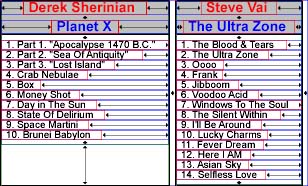
The following windows appears, it displays information about the intermediary document (after resizing) :
Document ex1.cd.svg looks like this under an SVG viewer (Batik may not
display it correctly) :
The list of parameters you can use to construct the array args is exactly
the same than the one you are allowed to use when transforming from a console :
| Attribute name | Description | Allowed values | Default value | Mandatory |
-debug |
Enters in debug mode (the graphic shows the boxes and the springs, and information about the intermediary document is displayed). | This parameter accepts no value. | - | No |
-defs |
Specifies the Definitions document that contains the background definitions. | Relative or absolute path to any Definitions document. | - | Yes if -xml not used |
-grp_in |
Specifies the GRP document to transform. | Relative or absolute path to any GRP document. | - | Yes if -xml not used |
-height |
Specifies the height of the resulting graphic. | Any positive real. If you specify this parameter, you must specify the -width
parameter too. |
- | No |
-svg_dtd |
Specifies the SVG DTD (file name or URL). If you don't specify a value for this
parameter, and if you don't use the parameter -svg_schema, it will be
assumed that the file svg.dtd is present in the directory containing the
XML document you intend to transform. |
If a file, relative or absolute path, or a URL to SVG DTD. | - | No |
-svg_dtdoutput |
In the case the SVG Doctype is a file, specifies whether, inside the SVG document, path to SVG DTD is absolute or relative. | absolute or relative. |
absolute |
No |
-svg_dtdpublicID |
In the case the SVG Doctype is a URL, specifies the public ID of the Doctype. | Any possible string for a public ID. | - | No |
-svg_schema |
Specifies the SVG Schema (file name or URL). | If a file, relative or absolute path, or a URL to SVG Schema. | - | No |
-svg_schemanamespace |
Specifies the SVG Schema namespace. It must be the same than the namespace specified by the Schema you use. | Any valid value for a namespace. | - | No |
-svg_schemaoutput |
In the case the SVG Schema is a file, specifies whether, inside the SVG document, path to SVG Schema is absolute or relative. | absolute or relative. |
absolute |
No |
-svg_schemaxsi |
Specifies the SVG document namespace. Generally http://www.w3.org/2001/XMLSchema-instance. |
Any valid value for a namespace. | http://www.w3.org/2001/XMLSchema-instance |
No |
-xml |
Specifies the XML document containing all the parameters. | Relative or absolute path to the XML document. | - | Yes if -xml_in and -xsl not used |
-width |
Specifies the width of the resulting graphic. | Any positive real. If you specify this parameter, you must specify the -height
parameter too. |
- | No |
Here is the list of constants defined by class transformer.util.Parameters
that you can use to build the name of the parameters for transforming GRP to SVG :
| Constant name | Constant value | Description |
DEBUG |
debug | Debug mode. |
DEFS |
defs | Definitions document to use. |
GRP_IN |
grp_in | GRP document to transform. |
PARAMETER_SIGN |
- | Minus sign placed in front of every parameter name. |
SVG_DTD |
svg_dtd | DTD of SVG document. |
SVG_DTD_OUTPUT |
svg_dtdoutput | Output type of SVG DTD (relative or
absolute). |
SVG_DTD_PUBLIC_ID |
svg_dtdpublicID | Public ID of SVG DTD. |
SVG_SCHEMA |
svg_schema | Schema of SVG document. |
SVG_SCHEMA_NAMESPACE |
svg_schemanamespace | SVG Schema namespace. Must be the same than the namespace specified by the Schema you use. |
SVG_SCHEMA_OUTPUT |
svg_schemaoutput | Output type of SVG Schema (relative or
absolute). |
SVG_SCHEMA_XSI |
svg_schemaxsi | SVG document namespace. Generally http://www.w3.org/2001/XMLSchema-instance. |
XML |
xml | XML document parameter. |