hbox &
vbox)Boxes hbox and vbox are non-final boxes. This means
that thy must contain at least one box. A hbox can contain
vboxes and any final boxes, while a vbox can contain
hboxes and any final boxes.
These boxes are very close and have the same properties. The only difference is that
with hbox you work with the X axis, while with vbox you work
with the Y axis. Thus, when something is told about a hbox, the same is true
with a vbox and vice versa. You just have to translate specific X axis
information to Y axis information. For instance, if for a hbox it is said
that boxes it contains are added from left to right along the X axis, then, for a
vbox, boxes it contains are added from top to bottom along the Y axis.
If you can only work with the width of a hbox, then you can only work with
the height of a vbox. And so on.
You can specify attributes for a non-final box. Here are the different attributes you can specify for such a box :
| Attribute name | Description | Allowed values | Default value | Mandatory |
background |
Specifies the background to apply to that tbox. |
Background defined in the definitions document. | - | No |
id |
Identifier of that tbox. |
Any value (must be unique inside the whole document). | - | No |
minSize |
Specifies the minimum size of the box (width for hbox, height for
vbox). |
Real values starting at 0, and special value infinite. |
0 |
No |
maxSize |
Specifies the maximum size of the box (width for hbox, height for
vbox). |
Real values starting at 0, and special values infinite and
fitToChildren. |
infinite |
No |
Note : background and id attributes are common to every
box.
To show how to use final boxes, we will take back the example used for background. May
be you noticed that the text displayed extended beyond its background. We will use more
boxes to produce a better result. Save the following code under
editor/XML/Examples/nonFinalBox1.grp :
    <?xml version="1.0" encoding="ISO-8859-1"?>
    <!DOCTYPE grp SYSTEM "../grp.dtd">
    <grp>
      <vbox background="back">
        <spring minSize="10"/>

        <hbox>
          <spring minSize="10"/>

          <vbox background="text">
            <spring minSize="5"/>

            <hbox>
              <spring minSize="5"/>
              <tbox fontSize="30" fontStyle="italic">non-final boxes</tbox>
              <spring minSize="5"/>
            </hbox>

            <spring minSize="5"/>
          </vbox>

          <spring minSize="10"/>
        </hbox>

        <spring minSize="10"/>
      </vbox>
    </grp>
We will use the same definitions document than previously. In a console, change to directory
editor/XML/Examples (if not already done), and then type :
java -cp ../../lib/taxi.jar fr.loria.taxi.transformer.TransformerGRPToSVG -grp_in nonFinalBox1.grp -defs examples.def -svg_dtd ../svg.dtd
You should see the following output :
    Parsing file examples.def
    Parsing file nonFinalBox1.grp
    Creating SVG document
    Generating SVG file nonFinalBox1.svg
Here is the graphic you should obtain :
With the -debug option, it shows the following structure :
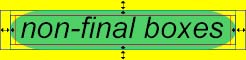
The idea was simply not to put directly the background on the tbox like we
did previsouly, but instead to the boxes wrapping it.
Let's just add some text to the example 1. Save the code below under
editor/XML/Examples/nonFinalBox2.grp :
    <?xml version="1.0" encoding="ISO-8859-1"?>
    <!DOCTYPE grp SYSTEM "../grp.dtd">
    <grp>
      <vbox background="back">
        <spring minSize="10"/>

        <hbox id="hbox1">
          <spring minSize="10"/>

          <vbox background="text">
            <spring minSize="5"/>

            <hbox id="hbox11">
              <spring minSize="5"/>
              <tbox fontSize="30" fontStyle="italic">A very long long long text</tbox>
              <spring minSize="5"/>
            </hbox>

            <spring minSize="5"/>
          </vbox>

          <spring minSize="10"/>
        </hbox>

        <spring minSize="10"/>

        <hbox id="hbox2">
          <spring minSize="10"/>

          <vbox background="text">
            <spring minSize="5"/>

            <hbox id="hbox21">
              <spring minSize="5"/>
              <tbox fontSize="30" fontStyle="italic">short</tbox>
              <spring minSize="5"/>
            </hbox>

            <spring minSize="5"/>
          </vbox>

          <spring minSize="10"/>
        </hbox>

        <spring minSize="10"/>
      </vbox>
    </grp>
We placed id upon some boxes to identify them easier for the further
explanations. Apply transformation, you should get that output :
    Parsing file examples.def
    Parsing file nonFinalBox2.grp
    Creating SVG document
    Generating SVG file nonFinalBox2.svg
And this is the graphic you obtained :

This is not very pleasant as the green background for the text short is
much wider than the text itself. What we wanted to get is that :
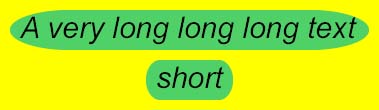
Let's have a look to what happened. To achieve this, transform the document
editor/XML/Examples/nonFinalBox2.grp with the -debug option.
You obtain this graphic :
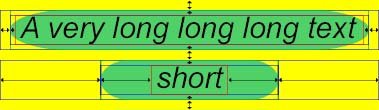
As we said previously, all boxes contained by a vbox must have the same
width. We clearly see that the first hbox, whose id is
hbox1, is much wider than the hbox hbox2. Thus,
hbox2 will stretch to be the same width than hbox1. To stretch,
hbox2 will ask its contained springs to stretch, but also the springs
contained by the boxes it contains, and the springs of the boxes contained by the boxes it
contains, and so on. In other words, springs contained by hbox2 and
hbox21 will be asked for stretching. As no maxSize has been specified
for any of these springs, the default value infinite is assumed, that is to say
that they can stretch at will.
To avoid hbox21 to stretch, we can simply specify a maxSize,
5 for instance, to the springs contained by hbox21. You can try this, it works.
But there is another way to avoid hbox21 to stretch, more powerfull in many
cases. The idea is to specify a maxSize for the box hbox21. As
it is a horizonzal box, maxSize will be applied to the width of the box. The
problem is to predict the size of the box : is we set a maxSize too small,
we will get warnings during the transformation and the graphic could be wrong. The trick
is to set maxSize to the special value fitToChildren. The maximum
width of the hbox will be the width of its content.
Change the code of editor/XML/Examples/nonFinalBox2.grp as follows :
    <?xml version="1.0" encoding="ISO-8859-1"?>
    <!DOCTYPE grp SYSTEM "../grp.dtd">
    <grp>
      <vbox background="back">
        <spring minSize="10"/>

        <hbox id="hbox1">
          <spring minSize="10"/>

          <vbox background="text">
            <spring minSize="5"/>

            <hbox id="hbox11">
              <spring minSize="5"/>
              <tbox fontSize="30" fontStyle="italic">A very long long long text</tbox>
              <spring minSize="5"/>
            </hbox>

            <spring minSize="5"/>
          </vbox>

          <spring minSize="10"/>
        </hbox>

        <spring minSize="10"/>

        <hbox id="hbox2" maxSize="fitToChildren">
          <spring minSize="10"/>

          <vbox background="text">
            <spring minSize="5"/>

            <hbox id="hbox21">
              <spring minSize="5"/>
              <tbox fontSize="30" fontStyle="italic">short</tbox>
              <spring minSize="5"/>
            </hbox>

            <spring minSize="5"/>
          </vbox>

          <spring minSize="10"/>
        </hbox>

        <spring minSize="10"/>
      </vbox>
    </grp>
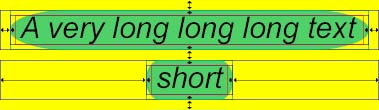
After transformation, the SVG graphic looks now correct, as we wanted it to :
With the -debug option, we can see how springs and boxes behaved :