ebox)An ebox is a final box with no content. It is empty. What is this box
intended for ? This box is particulary usefull when you want to place some background in the
graphic where there is no special content to place, for instance some text.
You can specify attributes for a non-final box. Here are the different attributes you can specify for such a box :
| Attribute name | Description | Allowed values | Default value | Mandatory |
background |
Specifies the background to apply to that tbox. |
Background defined in the definitions document. | - | No |
height |
Specifies the height of the box. | Real values starting at 0. | 0 |
No |
id |
Identifier of that tbox. |
Any value (must be unique inside the whole document). | - | No |
width |
Specifies the width of the box. | Realvalues starting at 0. | 0 | No |
Note : background and id attributes are common to every
box.
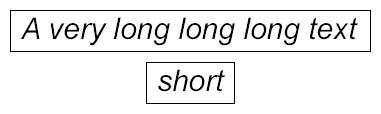
In this chapter, the graphic we want to produce is the following :
The idea is to place the text and use a background to produce the black rectangle that surrounds it.
Save the code below under editor/XML/Examples/ebox1.grp :
    <?xml version="1.0" encoding="ISO-8859-1"?>
    <!DOCTYPE grp SYSTEM "../grp.dtd">
    <grp>
      <vbox>
        <spring minSize="10"/>

        <hbox>
          <spring minSize="10"/>

          <vbox background="blackRectangle">
            <spring minSize="5"/>

            <hbox maxSize="fitToChildren">
              <spring minSize="5"/>
              <tbox fontSize="30" fontStyle="italic">A very long long long text</tbox>
              <spring minSize="5"/>
            </hbox>

            <spring minSize="5"/>
          </vbox>

          <spring minSize="10"/>
        </hbox>

        <spring minSize="10"/>

        <hbox>
          <spring minSize="10"/>

          <vbox background="blackRectangle">
            <spring minSize="5"/>

            <hbox maxSize="fitToChildren">
              <spring minSize="5"/>
              <tbox fontSize="30" fontStyle="italic">short</tbox>
              <spring minSize="5"/>
            </hbox>

            <spring minSize="5"/>
          </vbox>

          <spring minSize="10"/>
        </hbox>

        <spring minSize="10"/>
      </vbox>
    </grp>
Add the definition blackRectangle in the definitions document
editor/XML/Examples/examples.def :
    <?xml version="1.0" encoding="ISO-8859-1"?>
    <!DOCTYPE definitions SYSTEM "../definitions.dtd">

    <definitions>
      <definition id='back' width='10' height='10'>
        <rect x='0' y='0' width='10' height='10' style='fill:yellow'/>
      </definition>

      <definition id='blackRectangle' width='10' height='10'>
        <rect x='0' y='0' width='10' height='10' style='fill:none; stroke:black'/>
      </definition>

      <definition id='text' width='60' height='20'>
        <rect x='0' y='0' rx="10" ry="10" width='60' height='20' style='fill:rgb(3,189,147); opacity:0.7'/>
      </definition>
    </definitions>
In a console, change to directory editor/XML/Examples (if not already
done), and then type :
java -cp ../../lib/taxi.jar fr.loria.taxi.transformer.TransformerGRPToSVG -grp_in ebox1.grp -defs examples.def -svg_dtd ../svg.dtd
You should see the following output :
    Parsing file examples.def
    Parsing file ebox1.grp
    Creating SVG document
    Generating SVG file ebox1.svg
And obtain this graphic :
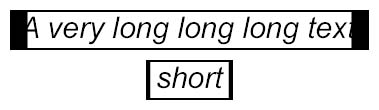
The graphic we obtained is is not exactly what we expected ! What happened ? Why does
it look so weird ? This is simple. As explained in the previous chapter, a background
always fits, by stretching, the size of the box it is applied to. A scale factor is applied
to the background on the X axis, and another one on the Y axis. These factor values depend
on the size of the box and the size of the background definition. Thus, the background
blackRectangle will never look the same applied to different boxes.
Does this mean that it is impossible to surround text with a black rectangle ? No, but
we will have to use another approach. Instead of trying to draw the rectangle as one piece,
we will cut it into 4 pieces : 2 horizontal lines (one on top of the text, the other one
on bottom), and 2 vertical lines (one on left of the text, the other one on right). This
is where ebox comes to help us : we will place a background where there is no
special content.
Save the code below under editor/XML/Examples/ebox2.grp (we don't use
anymore the background blackRectangle, and the code added over the previous
example ebox1.grp is shown in bold) :
    <?xml version="1.0" encoding="ISO-8859-1"?>
    <!DOCTYPE grp SYSTEM "../grp.dtd">
    <grp>
      <vbox>
        <spring minSize="10"/>

        <hbox>
          <spring minSize="10"/>

          <vbox background="blackPoint">
            <ebox width="1"/>
            <spring/>
          </vbox>

          <vbox>
            <hbox background="blackPoint">
              <ebox height="1"/>
              <spring/>
            </hbox>

            <spring minSize="5"/>

            <hbox maxSize="fitToChildren">
              <spring minSize="5"/>
              <tbox fontSize="30" fontStyle="italic">A very long long long text</tbox>
              <spring minSize="5"/>
            </hbox>

            <spring minSize="5"/>

            <hbox background="blackPoint">
              <ebox height="1"/>
              <spring/>
            </hbox>
          </vbox>

          <vbox background="blackPoint">
            <ebox width="1"/>
            <spring/>
          </vbox>

          <spring minSize="10"/>
        </hbox>

        <spring minSize="10"/>

        <hbox>
          <spring minSize="10"/>

          <vbox background="blackPoint">
            <ebox width="1"/>
            <spring/>
          </vbox>

          <vbox>
            <hbox background="blackPoint">
              <ebox height="1"/>
              <spring/>
            </hbox>

            <spring minSize="5"/>

            <hbox maxSize="fitToChildren">
              <spring minSize="5"/>
              <tbox fontSize="30" fontStyle="italic">short</tbox>
              <spring minSize="5"/>
            </hbox>

            <spring minSize="5"/>

            <hbox background="blackPoint">
              <ebox height="1"/>
              <spring/>
            </hbox>
          </vbox>

          <vbox background="blackPoint">
            <ebox width="1"/>
            <spring/>
          </vbox>

          <spring minSize="10"/>
        </hbox>

        <spring minSize="10"/>
      </vbox>
    </grp>
Add the definition blackPoint in the definitions document
editor/XML/Examples/examples.def :
    <?xml version="1.0" encoding="ISO-8859-1"?>
    <!DOCTYPE definitions SYSTEM "../definitions.dtd">

    <definitions>
      <definition id='back' width='10' height='10'>
        <rect x='0' y='0' width='10' height='10' style='fill:yellow'/>
      </definition>

      <definition id='blackRectangle' width='10' height='10'>
        <rect x='0' y='0' width='10' height='10' style='fill:none; stroke:black'/>
      </definition>

      <definition id='blackPoint' width='1' height='1'>
        <line x1='0' y1='0' x2='1' y2='1' style='stroke:black'/>
      </definition>

      <definition id='text' width='60' height='20'>
        <rect x='0' y='0' rx="10" ry="10" width='60' height='20' style='fill:rgb(3,189,147); opacity:0.7'/>
      </definition>
    </definitions>
In a console, change to directory editor/XML/Examples (if not already
done), and then type :
java -cp ../../lib/taxi.jar fr.loria.taxi.transformer.TransformerGRPToSVG -grp_in ebox2.grp -defs examples.def -svg_dtd ../svg.dtd
You should see the following output :
    Parsing file examples.def
    Parsing file ebox2.grp
    Creating SVG document
    Generating SVG file ebox2.svg
And obtain this graphic :
This is what we did (boxes on which the background blackPoint is applied
are shown hatched on the figure below) :
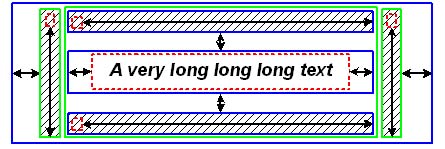
Vertical boxes are shown in green, horizontal in blue, and final boxes in red.
The code looked like that for an vertical box for instance :
    <vbox background="blackPoint">
      <ebox width="1"/>
      <spring/>
    </vbox>
We define a vertical box with the blackPoint background. This background
is actually a point that will stretch to fit the size of the box, so that the box will
produce a black rectangle on the SVG graphic.
A vertical box is non-final, that is to say that it must contain at least one box. So
we place an ebox inside it. What matters is the width of this
ebox as it will determine the width of its parent box (the vertical box) on
which is tied a background. Thus, the width of the rectangle produced on the graphic is the
width of this ebox. We decide to set it to 1.
We don't know the height the ebox must have not to generate warnings during
the transformation. Indeed, the vbox containing our ebox is itself
contained by a hbox. All the boxes contained by this hbox must
have the same height. That means that our vbox must be stretchable. This is
why we place a spring inside the vbox containing the
ebox.